SDKs Overview
Flagsmith ships with SDKs for a bunch of different programming languages. We also have a REST API that you can use if you want to consume the API directly.
Our SDKs are split into two different groups. These SDKs have different methods of operation due to the differences in their operating environment:
- Client-side (e.g. browser-based Javascript).
- Server-side (e.g. Java or Python).
Environment Keys come in two different types: Client-side and Server-side keys. Make sure you use the correct key depending on the SDK you are using.
Client-side SDKS
Client-side SDKs run in web browsers or on mobile devices. These runtimes execute within untrusted environments. Anyone using the Javascript SDK in a web browser, for example, can find the Client-side SDK, create a new Identity, look at their flags and potentially write Traits to the Identity.
Client-side SDKs are also limited to the types of data that they have access to.
Client-side Environment keys are designed to be shared publicly, for example in your HTML/JS code that is sent to a web browser.
Client-side SDKs hit our Edge API directly to retrieve their flags.
Read more about our Client-side SDKs for your language/platform:
Server-side SDKs
Server-side SDKs run within trusted environments - typically the server infrastructure that you have control over. Because of this, you should not share your Server-side Environment keys publicly; they should be treated as secret.
The Server-side SDKs can operate in 2 different modes:
- Remote Evaluation
- Local Evaluation
It's important to understand which mode is right for your use case, and what the pros and cons of each one are. This is detailed below.
Remote Evaluation
In this mode, every time the SDK needs to get Flags, it will make a request to the Flagsmith API to get the Flags for the particular request.
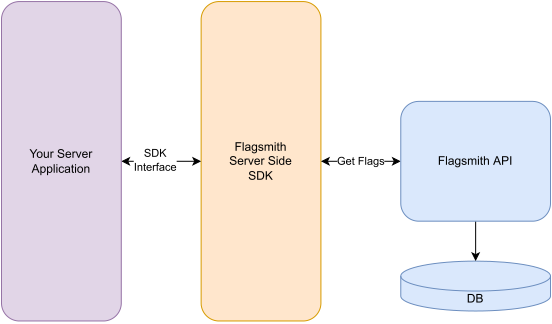
Remote Evaluation is the default mode; initialise the SDK and you will be running in Remote Evaluation mode.
This is the same way that the Client-side SDKs work.
Local Evaluation
In this mode, all flag values are calculated locally, on your server. The Flagsmith SDK includes an implementation of the Flag Engine, and the engine runs within your server environment within the Flagsmith SDK.
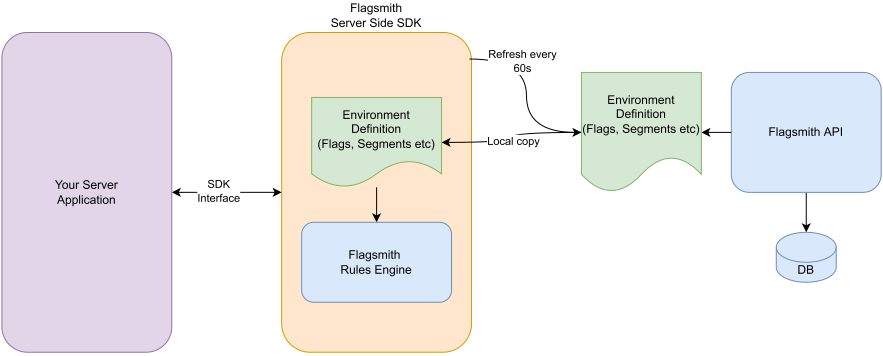
You have to configure the SDK to run in Local Evaluation mode. See the SDK configuration options for details on how to do that in your particular language.
When the SDK is initialised in Local Evaluation mode, it grabs the entire set of details about the Environment from the Flagsmith API. For a given Environment, this includes:
- Flags and flag values
- Segments, segment rules, and segment overrides
- Identity overrides
This full complement of Environment data enables the Flagsmith SDK to run the Flag Engine locally and natively within your server infrastructure.
When using identity overrides in local evaluation:
- Keep overrides count under 1500-2000, depending on flag value size.
- Make sure your environment settings enable it.
- Provide a full set of traits when requesting identity flags.
The SDK has to request all of the data about an Environment in order to run. Because some of this data could be sensitive (for example, your Segment Rules), the SDK requires a specific Server-side Environment Key.
The benefits to doing this are mainly one of latency and performance. Your server-side code does not need to hit the Flagsmith API each time a user requests their flags - the flags can be computed locally. Hence it does not need to block and wait for a response back from the Flagsmith API.
In order to keep their Environment data up-to-date, SDKs running in Local Evaluation mode will poll the Flagsmith API regularly and update their local Environment data with any changes from the Flagsmith API. By default the SDK will poll the Flagsmith every 60 seconds; this rate is configurable within each SDK.
It's important to understand the pros and cons for running Local Evaluation.
All our Client-side SDKs run in Remote Evaluation mode only; they cannot run in Local Evaluation mode. The reason for this is down to data sensitivity. Because some of this data could be sensitive (for example, your Segment Rules), we only allow Client-side SDKs to run in Remote Evaluation mode.
Because Clients are almost always operating remotely from your server infrastructure, there is little benefit to them running in Local Evaluation mode.
Networking Model
When are network requests made, and when do you need to consider network latency? It depends on your evaluation mode, and whether you are using Client-side or Server-side SDKs!
Remote Evaluation Network Model
Client-side Network Model
- By default, client-side SDKs will initialise and retrieve all the Flags for an Environment and store them in local memory. Flag evaluations within the SDK are then a simple lookup in memory with no associated network call.
- If the context of an Identity changes, for example if a new Trait is added to the Identity, the SDK will make a new call to the Flagsmith API to update the Traits of the Identity and receive new Flags, as the value of those flags may have changed. This happens in one network call.
- If an entirely new Identity is provided, the SDK will make a new call to the Flagsmith API to receive new Flags.
- Other than the above two points, the SDK will not make further network requests to the Flagsmith API. If you wish you can manually trigger a network call in code and refresh Flags locally.
Exact Client-side specifics of initialisation and Flag retrieval depends on the language and platform. Check the docs for the relevant language platform for details.
Server-side Network Model
- Flagsmith server-side SDKs do not store Flags in local memory. Every Flag evaluation in your code will trigger a network request.
If this approach does not work for you (generally for reasons of latency or overly chatty networking) you should consider Local Evaluation mode (explained below) or the Edge Proxy.
Local Evaluation Network Model
Local Evaluation mode is only available with Server-side SDKs.
- When the SDK is initialised, it will make a network request to the Flagsmith API to receive all the Environment data it needs to run Local Evaluations. The SDK receives a single JSON document with all this data.
- Future evaluations are all computed locally within the SDK runtime. This means they are extremely fast as there is no network latency to account for.
- No further network calls take place for 60 seconds.
- After 60 seconds have elapsed, the SDK will refresh the JSON Environment Document with a network call to the Flagsmith API.
The Environment Document
The Environment Document in the context of Flagsmith is a structured JSON file containing all the configuration settings for feature flags within a single Environment, such as development, staging, and production. It typically includes details like feature names, identities, rules, and associated metadata.
This document serves as a source of truth for managing feature flags across various situations, allowing developers to easily control feature rollout and behaviour without redeploying code. JSON Environment Documents are primarily used with Local Evaluation and Offline Mode.
The Environment Document schema can be found in our Swagger docs - search for
/api/v1/environment-document.
A sample document is below.
{
 "id": 30156,
 "api_key": "npfo95nMwUw8cjHXdHi2hG",
 "project": {
  "id": 11590,
  "name": "Edge API E2E",
  "organisation": {
   "id": 13,
   "name": "Flagsmith",
   "feature_analytics": false,
   "stop_serving_flags": false,
   "persist_trait_data": true
  },
  "hide_disabled_flags": false,
  "segments": [],
  "enable_realtime_updates": false,
  "server_key_only_feature_ids": []
 },
 "feature_states": [
  {
   "feature": {
    "id": 48865,
    "name": "example_feature",
    "type": "STANDARD"
   },
   "enabled": false,
   "django_id": 266961,
   "feature_segment": null,
   "featurestate_uuid": "d7303252-33a7-4991-b20f-8564959e42c8",
   "feature_state_value": "test2",
   "multivariate_feature_state_values": []
  },
  {
   "feature": {
    "id": 48866,
    "name": "example_mv_feature",
    "type": "MULTIVARIATE"
   },
   "enabled": false,
   "django_id": 266962,
   "feature_segment": null,
   "featurestate_uuid": "5d688e14-4e5e-47e5-9c53-b452ac9e5f16",
   "feature_state_value": "control",
   "multivariate_feature_state_values": [
    {
     "multivariate_feature_option": {
      "value": "variant1",
      "id": 6596
     },
     "percentage_allocation": 10.0,
     "id": 20957,
     "mv_fs_value_uuid": "6d96689d-9b1b-4507-9894-b6a0903084f8"
    },
    {
     "multivariate_feature_option": {
      "value": "variant2",
      "id": 6595
     },
     "percentage_allocation": 10.0,
     "id": 20956,
     "mv_fs_value_uuid": "6227b016-4221-42a9-89e6-7c31a6987a8c"
    }
   ]
  }
 ],
 "identity_overrides": [],
 "name": "E2E",
 "allow_client_traits": true,
 "updated_at": "2024-04-18T08:16:20.678868+00:00",
 "hide_sensitive_data": false,
 "hide_disabled_flags": null,
 "use_identity_composite_key_for_hashing": true,
 "amplitude_config": null,
 "dynatrace_config": null,
 "heap_config": null,
 "mixpanel_config": null,
 "rudderstack_config": null,
 "segment_config": null,
 "webhook_config": null
}
API Keys
Flagsmith has three different type of SDK Key.
Client-Side SDK
Client-side SDK Keys give both client-side SDKs and server-side SDKs access to Remote Evaluation mode.
These keys are not secret and can be considered public.
Server-Side SDK
Server-side SDK Keys give server-side SDKs access to Local Evaluation mode.
These keys are secret and should not be shared.
Management API
Management API keys are used to interact with the Flagsmith API directly. These keys can be used in the following situations:
- If you want to work with Flagsmith programatically, for example when creating and deleting Environments as part of a CI/CD process.
- When using the Terraform Provider.
These keys are secret and should not be shared.
Client-side SDK approaches
Since Client-side SDKs will generally be associated with a single Identity (the person who owns the client device!), a common pattern for networking implementation is:
- The user launches your application for the first time. Since your application does not know who they are, a call to get the default Environment Flags is made by the Flagsmith SDK.
- After the user logs in, make a second request to get the Flags with the new user Identity.
- Cache these flags locally on the device.
- Upon subsequent application launches, immediately read the flags from the cached store from step 3 and use those as your application Flag values.
- In the background make a request to Flagsmith to refresh their Flags.
- Update both your application and the local cache with these fresh flags.
Things to note
- Flagsmith always returns all Environment Flags during API calls. In fact, there is no way to request the state of a single flag via our API.
- The 60 second polling time in Local Evaluation mode is configurable.
- You can provide your own caching layer (with a short TTL) in front of Local Evaluation mode requests if you wish - this is not uncommon.
Pros, Cons and Caveats
For Remote Evaluation
- Identities are persisted within the Flagsmith Datastore.
- Identity overrides specified within the Dashboard.
- All Integrations work as designed.
For Local Evaluation
When running in Local Evaluation mode, our SDKs expect to be run as long-lived processes. Serverless platforms like AWS Lambda either break this contract or make it much more complicated. As a result, we do not recommend running our SDKs in Local Evaluation mode on top of platforms like Lambda where you do not have complete control over process lifetimes.
Our Edge Proxy is a good candidate if you need to run local evaluation mode alongside serverless platforms.
The benefit of running in Local Evaluation mode is that you can process flag evaluations much more efficiently as they are all computed locally.
- Make sure Environment Settings > SDK Settings > Use identity overrides in local evaluation is toggled on. To keep evaluation consistent, it's off by default for projects created before January 2024.
- Identities and their Traits are not read from or written to the Flagsmith API, and so are not persisted in the datastore. This means that you have to provide the full complement of Traits when requesting the Flags for a particular Identity. Our SDKs all provide relevant methods to achieve this.
- Analytics-based Integrations do not run. Flag Analytics do still work, if enabled within the SDK setup.
- Currently, Flagsmith SDKs support up to 1500-2000 identity overrides, depending on flag value sizes, when used with Edge API. If you store more than 1MB of override data, you will need to query the Edge API endpoint directly and use pagination:
curl https://edge.api.flagsmith.com/api/v1/environment-document \
  -H 'X-Environment-Key: <Your server-side environment key>' \
  --verbose
The link response header will contain the url to next page:
Content-Type: application/json
...
link: </api/v1/environment-document/?page_id=identity_override%3A60074%lastreadid>; rel="next"
...